


Code Analysis with Java and AngularJS Project via SonarQube
Many Java based projects are shifting away from more traditional Java based frontend technologies, such as JSP, JSF, and GWT. Today, they are moving to Single Page Application technologies like AngularJS. This leaves Java as the language for the backend. As a result, you will likely experience a project using at least a JavaScript based frontend technology and a backend technology like Java. Another big trend these days is improving the software development lifecycle by implementing Continuous Integration, Continuous Deployment, and code analysis as a part of your project or company’s DevOps strategy. This tutorial will show you how to tie a project built using Java and AngularJS with Jenkins, BitBucket and SonarQube.
If you are using Maven and the concept of microservices, you likely are following a standard directory structure used for many Java projects. Also, if you have a web application, you are likely used to using a webapp folder for your presentation code, perhaps written with JSPs or JSFs. With that assumption, if you were switching to a JavaScript based frontend framework, like AngularJS, then you may have also put your JavaScript files in this very same webapp folder. Lets say we have two services and one project for the web application, then you may have a Git repo that looks like the following:

Microservices Maven Java Standard Directory Structure
The dvo-web-ui is the web application project. You likely wouldn’t have any Java code mixed in this project, but you may have some Selenium tests (though maybe not the best testing tool for AngularJS). The Java code would be in the two microservices, called dvo-claim-service and dvo-product-service.
If you don’t already have Tomcat installed, you can download the latest here:
- https://tomcat.apache.org or, more specifically I am using Tomcat 9.0.5
Now, find your downloaded file, apache-tomcat-9.0.5.zip, and then unzip the file. If using a Mac/Unix build, you will likely need to make the scripts in bin executable by doing the following:
[code language=”bash”]
$ chmod 755 bin/*.sh
$ ls -ltr bin/*.sh
-rwxr-xr-x@ 1 kcoy staff 1908 Feb 6 21:43 bin/version.sh
-rwxr-xr-x@ 1 kcoy staff 5483 Feb 6 21:43 bin/tool-wrapper.sh
-rwxr-xr-x@ 1 kcoy staff 1904 Feb 6 21:43 bin/startup.sh
-rwxr-xr-x@ 1 kcoy staff 1902 Feb 6 21:43 bin/shutdown.sh
-rwxr-xr-x@ 1 kcoy staff 3680 Feb 6 21:43 bin/setclasspath.sh
-rwxr-xr-x@ 1 kcoy staff 1965 Feb 6 21:43 bin/digest.sh
-rwxr-xr-x@ 1 kcoy staff 8509 Feb 6 21:43 bin/daemon.sh
-rwxr-xr-x@ 1 kcoy staff 1922 Feb 6 21:43 bin/configtest.sh
-rwxr-xr-x@ 1 kcoy staff 1997 Feb 6 21:43 bin/ciphers.sh
-rwxr-xr-x@ 1 kcoy staff 23315 Feb 6 21:43 bin/catalina.sh
[/code]
Next, you will need to download the Jenkins WAR:
I would go for the Long-Term Support (LTS) build, which is currently, 2.89.4
Take jenkins.war and move it your webapps folder in the Tomcat directory you just unzipped.
[code language=”bash”]
$ ./bin/startup.sh
Using CATALINA_BASE: /Applications/apache-tomcat-9.0.5
Using CATALINA_HOME: /Applications/apache-tomcat-9.0.5
Using CATALINA_TMPDIR: /Applications/apache-tomcat-9.0.5/temp
Using JRE_HOME: /Library/Java/JavaVirtualMachines/jdk1.8.0_121.jdk/Contents/Home
Using CLASSPATH: /Applications/apache-tomcat-9.0.5/bin/bootstrap.jar:/Applications/apache-tomcat-9.0.5/bin/tomcat-juli.jar
Tomcat started.
[/code]
You should be able to now go to the following link (you’ll need to follow the setup instructions if this is your first time launching Jenkins):
Afterwards, you’ll need to install the SonarQube plugin by going to Manage Jenkins ? Manage Plugins ? Available tab ? Filter “SonarQube” ? Select SonarQube Scanner ? Install without restart ? Check Restart Jenkins.
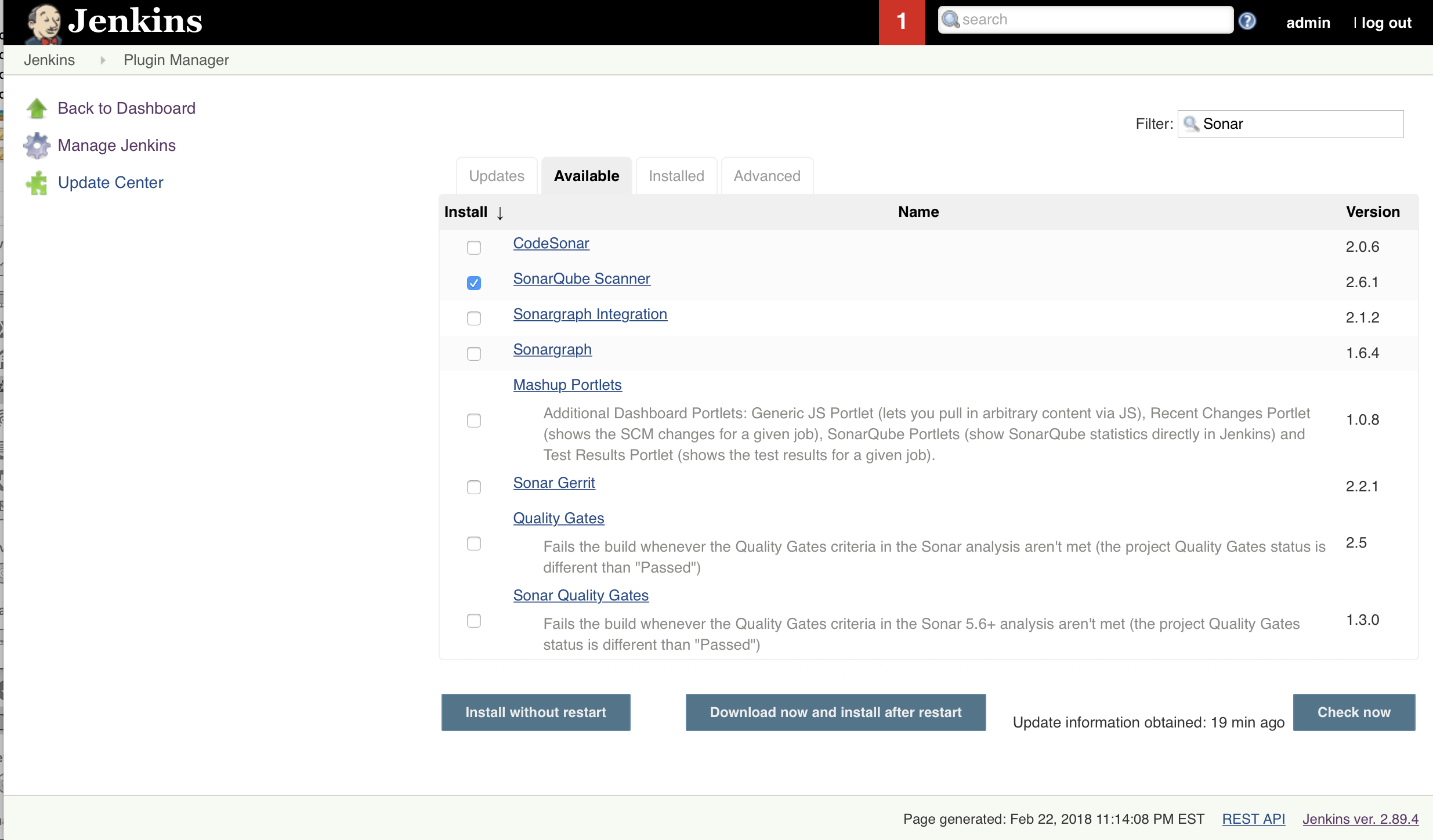
Installing SonarQube Scanner Plugin for Jenkins
I like to use BitBucket for source control as it comes with lots of nice features, such as a wiki, managers users/teams and is FREE for five or less users, If you are using BitBucket, you’ll need to install the BitBucket plugin, as well, by going to Manage Jenkins ? Manage Plugins ? Available tab ? Filter “BitBucket” ? Select BitBucket ? Install without restart ? Check Restart Jenkins.
Also, in BitBucket, you’ll need to setup a WebHook, which can be used to trigger a Jenkins build (with the BitBucket plugin) every time a code push is made to your Git repository hosted by BitBucket. As an aside, BitBucket is hosted on the cloud and if your Tomcat is being being hosted locally on your computer, then you’ll need to expose your localhost to the outside world. An easy way to do this is with ngrok. See these instructions. Here is a screenshot showing how to configure the webhook under Settings in your BitBucket project.

Jenkins BitBucket webhook
Now you will need to make sure you have the SonarQube Scanner configured in Jenkins and have your project set up to use it. You’ll need to make sure you go to Jenkins ? Manage Jenkins ? Global Tool Configuration to configure a SonarQube Scanner to use and go to Jenkins ? Manage Jenkins ? Configure System to point to your SonarQube instance you downloaded previously. Make sure you have your SonarQube instance running:
[code language=”bash”]
sonarqube-5.6.5 kcoy$ ./bin/macosx-universal-64/sonar.sh start
[/code]
Here are some screenshots showing how to configure SonarQube in Jenkins and how to configure a project to use your SonarQube Scanner.
-

- Jenkins Configuration for SonarQube server.
-

- Configure SonarQube Scanner in Jenkins Global Tool Configuration
-

- Configure Jenkins Project to do point to BitBucket for your repository.
-

- Configure Jenkins Project to do a build and to use the SonarQube Scanner
Next, you need to make sure that your project has a sonar-project.properties file in the root of the parent project. Here is an example of this file configured for multiple modules and for scanning both Java and JavaScript code.
[code language=”bash”]
#
# Used to configure project to work with SonarQube via Jenkins automatically
#
# Required metadata
sonar.projectKey=dvo-claim-service
sonar.projectName=DVO Claim Service project analyzed with the SonarQube Runner
sonar.projectVersion=1.0
#sonar.host.url=http://15.82.89.248:9000
sonar.jdbc.username=sonar
sonar.jdbc.password=********
sonar.jdbc.url=jdbc:mysql://localhost:3306/sonar?useUnicode=true&characterEncoding=utf8&rewriteBatchedStatements=true&useConfigs=maxPerformance
# Comma-separated paths to directories with sources (required)
sonar.sources=src/test/java,src/main/java
# Language
sonar.language=java
# Encoding of the source files
sonar.sourceEncoding=UTF-8
# JUnit reports
sonar.junit.reportsPath=**/target/surefire-reports/
# Set module IDs
sonar.modules=dvo-claim-service,dvo-web-ui,dvo-product-service
# Default module base directory is <curent_directory>/<module_ID>
# It has to be overriden for dvo-web-ui
dvo-web-ui.sonar.projectBaseDir=dvo-web-ui
# Overrides some parent properties in dvo-web-ui
dvo-web-ui.sonar.projectName=DVO Web UI project analyzed with the SonarQube Runner
dvo-web-ui.sonar.sources=src/main/webapp
dvo-web-ui.sonar.language=js
# Default module base directory is <curent_directory>/<module_ID>
# It has to be overriden for dvo-product-service
dvo-product-service.sonar.projectBaseDir=dvo-product-service
# Overrides some parent properties in dvo-product-service
dvo-product-service.sonar.projectName=DVO Product Service project analyzed with the SonarQube Runner
dvo-product-service.sonar.sources=src/test/java,src/main/java
dvo-product-service.sonar.language=java
[/code]
Now, so long as you have Tomcat, BitBucket, Jenkins, and SonarQube up and running, you can push a code change to your Git repository hosted by BitBucket and see it automatically kick off a build in Jenkins. If the build is successful, you will be able to see your SonarQube Scanner results. Good luck in your implementations!
-

- Jenkins Project with SonarQube link
-

- SonarQube Project results.
As the admin of this site is working, no doubt very soon it
will be renowned, due to its quality contents.
I view something truly special in this internet site.
Only wanna remark that you have a very decent website , I enjoy the design and style it really stands out.
Your piece was both informative and thought-provoking. Thanks for the great work!
A masterpiece of writing! You’ve covered all bases with elegance.
You have a unique perspective that I find incredibly valuable. Thank you for sharing.
This was a thoroughly insightful enjoy reading. Thank you for sharing your expertise!
I’m so grateful for the information you’ve shared. It’s been incredibly enlightening!
Your piece was both informative and thought-provoking. Thanks for the great work!
This is a brilliant piece of writing. You’ve nailed it perfectly!
You have a gift for explaining things in an understandable way. Thank you!
The posts inspire me regularly. The depth you bring to The topics is truly exceptional.
Always excited to see The posts, like waiting for a message from a crush. Another excellent read!
This post is a testament to The expertise and hard work. Thank you!
Breaking down this topic so clearly was no small feat. Thanks for making it accessible.
Articulated points with finesse, like a lawyer, but without the billable hours.
Discovering The Writing felt like finding the perfect match. The intellect and charm are a rare combo.
The insights are like a fine wine—rich, fulfilling, and leaving me wanting more.
The Writing is like a secret garden, each post a path leading to new discoveries and delights.
You’ve articulated The points with such finesse. Truly a pleasure to read.
I learned a lot, and now I’m curious about what else you could teach me. The intelligence is as captivating as The prose.
The dedication to high quality content is evident and incredibly appealing. It’s hard not to admire someone who cares so much.
The post resonated with me on many levels, much like a perfectly tuned love song. Thanks for the harmony.
This comprehensive article had me hanging on every word, much like I would during a late-night chat.
The perspective is like a rare gem, valuable and unique in the vastness of the internet.
Beautifully written and incredibly informative, The post has captured my attention as if it were a love letter written just for me.
This post is packed with useful insights. Thanks for sharing The knowledge!
Reading The work is like watching the sunrise, a daily reminder of beauty and new beginnings.
Each post you write is like a letter I’ve been waiting for. Always delivered with care.
This comprehensive article had me hanging on every word, much like I would during a late-night chat.
You weave words with the skill of a master tailor, crafting pieces that fit the mind perfectly.
Every piece you write is like adding another book to my mental library. Thanks for expanding my collection.
The writing style is like a signature scent—distinct, memorable, and always pleasant.
Thank you for adding value to the conversation with The insights.
The insights add so much value, like an unexpected compliment that brightens one’s day. Thanks for sharing.
The depth you bring to The topics is like diving into a deep pool, refreshing and invigorating.
This was a thoroughly insightful read. Thank you for sharing The expertise!
A masterpiece of writing. Van Gogh’s got nothing on you, except maybe both ears.
I admire the way you tackled this hard to understand issue. Very enlightening!
The perspective is like a rare gem, valuable and unique in the vastness of the internet.
The Writing has become a go-to resource for me. The effort you put into The posts is truly appreciated.
The work is truly inspirational. It’s as if you’ve found a way to whisper sweet nothings to my intellect.
The dedication to high quality content is evident. Keep up the great work!
Reading The work is like catching up with an old friend; comfortable, enlightening, and always welcome.
The insights added a lot of value, in a way only Google Scholar dreams of. Thanks for the enlightenment.
The unique perspective is as intriguing as a mystery novel. Can’t wait to read the next chapter.
The Writing has become like a favorite meeting spot, where great minds and ideas mingle.
Articulated points with finesse, like a lawyer, but without the billable hours.
Such a well-researched piece! It’s evident how much effort you’ve put in.
This post is a testament to The expertise and hard work. Thank you!